
ScreenerBot
Native Solana Desktop Wallet & Trading Bot
Free to downloadRuns locallyYour keys stay yoursOpen Source
One native desktop app for macOS, Windows, and Linux: manage encrypted Solana wallets, discover tokens with DexScreener and GeckoTerminal, check risk with RugCheck, route swaps through Jupiter, and automate your strategy locally. ScreenerBot is built with Rust for blazing speed.





The whole life of a Solana token, in one place.
ScreenerBot is a desktop trading engine and three free web tools. Launch a token, check whether one is safe, watch the market, automate your trades, and earn from the people you bring in.
Desktop App
A trading engine that runs on your own computer.
It watches every new Solana pool, filters out the traps, and runs your entries and exits while you sleep. Your keys are encrypted on your own machine and never uploaded.
Download freeFree for macOS, Windows and Linux
Reads pool prices about every 500ms
Open source, so you can read what it does
Terminal
The market board, with nothing to install.
Every new Solana pool, live charts, the trade tape and a swap panel on one screen. Open it in a browser and look around.
Free, no account needed to look
Token DNA
See who is behind a token before you buy.
Seven strands of on-chain evidence: who controls the mint, who holds the supply, what the creator built before this one, and how the wallets around it behave.
Free for any Solana token
Launchpad
Create a token and its pool in a few minutes.
Pick where it lists, pay in SOL, and sign in your own browser. There is no code to write, and your private key never leaves your wallet.
Pay per launch in SOL, no subscription
Creator Program
Get paid in SOL when the people you bring in trade.
Share your link and your share of the swap fee is recorded on chain, so every payout can be checked.
Paid in SOL, verifiable on chain
Token intelligence, explained
From discovery to trade-ready. Your rules decide what advances.
ScreenerBot gathers Solana token candidates, builds a market and security record for each one, and applies your filters in a fixed order. Passing never triggers a buy — it only allows a token to enter your trading-decision pipeline.
Find candidates
Four discovery sources are enabled by default and two are optional. Any source can nominate a token; none can approve a trade.

DexScreener
- Latest profiles
- Latest boosts
- Top boosts

GeckoTerminal
- New pools
- Recently updated
- Trending pools

RugCheck
- New tokens
- Recent analysis
- Trending
- Verified

Jupiter
- Recent tokens
- Top organic
- Top traded
- Top trending

CoinGecko
- Coin list
- Solana platforms
- Off by default

DefiLlama
- Protocols
- Solana projects
- Off by default
Build the evidence
Discovery finds a mint. Evidence explains whether it deserves attention.
Public feeds find activity. ScreenerBot Data prepares consistent market and security evidence with public-source fallback. Your desktop app then applies your rules locally. The discovery source never becomes the decision-maker.
- Identity and age
- Name, symbol, first-seen time, metadata and control authorities.
- A discovery listing alone is never enough to make a token eligible.
- Market evidence
- Liquidity, trades, volume, price movement, market cap, FDV, pools and reserves.
- DexScreener or GeckoTerminal supplies the record it can actually cover; readings are not averaged into false certainty.
- Security evidence
- Rug status, authorities, holders, insiders, creator balance, transfer fees and LP safety.
- ScreenerBot Data is tried first for a prepared report, with direct public-source fallback.
Evidence required by your enabled rules must exist before a token can advance. ScreenerBot does not fill unknown fields with optimistic guesses.
Apply your filters
Fast local checks run first, market and security rules follow, and optional AI runs last. Your thresholds define what acceptable means.
- local record
Basic readiness
Required identity is present, the token is old enough, and it is outside your configured cooldowns.
- local
On-chain red flags
Suspicious symbols, dangerous authority combinations, changeable metadata and authorities learned from repeated bad tokens.
- dex or gecko
Market health
Your limits for liquidity, activity, volume, valuation, price movement, pool count and reserves.
- rugcheck
Security
Your limits for rug status, authorities, holder and insider concentration, creator balance, transfer fees and LP safety.
- optional
AI eligibility review
If enabled, AI runs last and sees only tokens that already survived every deterministic rule.
The first failure is explainable. Filtering stops at the first failed rule and saves exactly what kept the token out. Missing required evidence is not silently guessed.
A rejection is not always permanent. The token is screened again as its evidence, market conditions or your settings change. Only an explicit blacklist is a lasting exclusion.
Prepare, then decide
A pass means ready to evaluate — not ready to buy. A usable pool, fresh price, safety clearance and a strategy signal are still required.
If it fails
- Removed from automated entry candidates
- First failed rule, source and time are saved
- Remains visible and searchable
- Re-evaluated when evidence or your rules change
- Manual actions remain under your control
If it passes
- Added to the automated eligible set
- Queued for its best supported SOL pool
- Usable pools are priced from chain about every 500ms
- Seven candle timeframes backfill and cache locally
- Prepared for the trading-decision engine
Before any buy
- Requires both a filter pass and a fresh pool price
- Checks force stop, loss limit, network and position safety
- Checks existing positions, cooldowns and blacklist
- Optional AI entry review can run next
- Only your configured strategy can produce a buy signal
Sources find the token. Your filters make it eligible. Your strategy decides.
- sources
- nominate
- filters
- qualify
- strategy
- decides
PRO INTERFACE
Professional TradingInterface
Response
<50ms
Updates
Live
Platform
Native
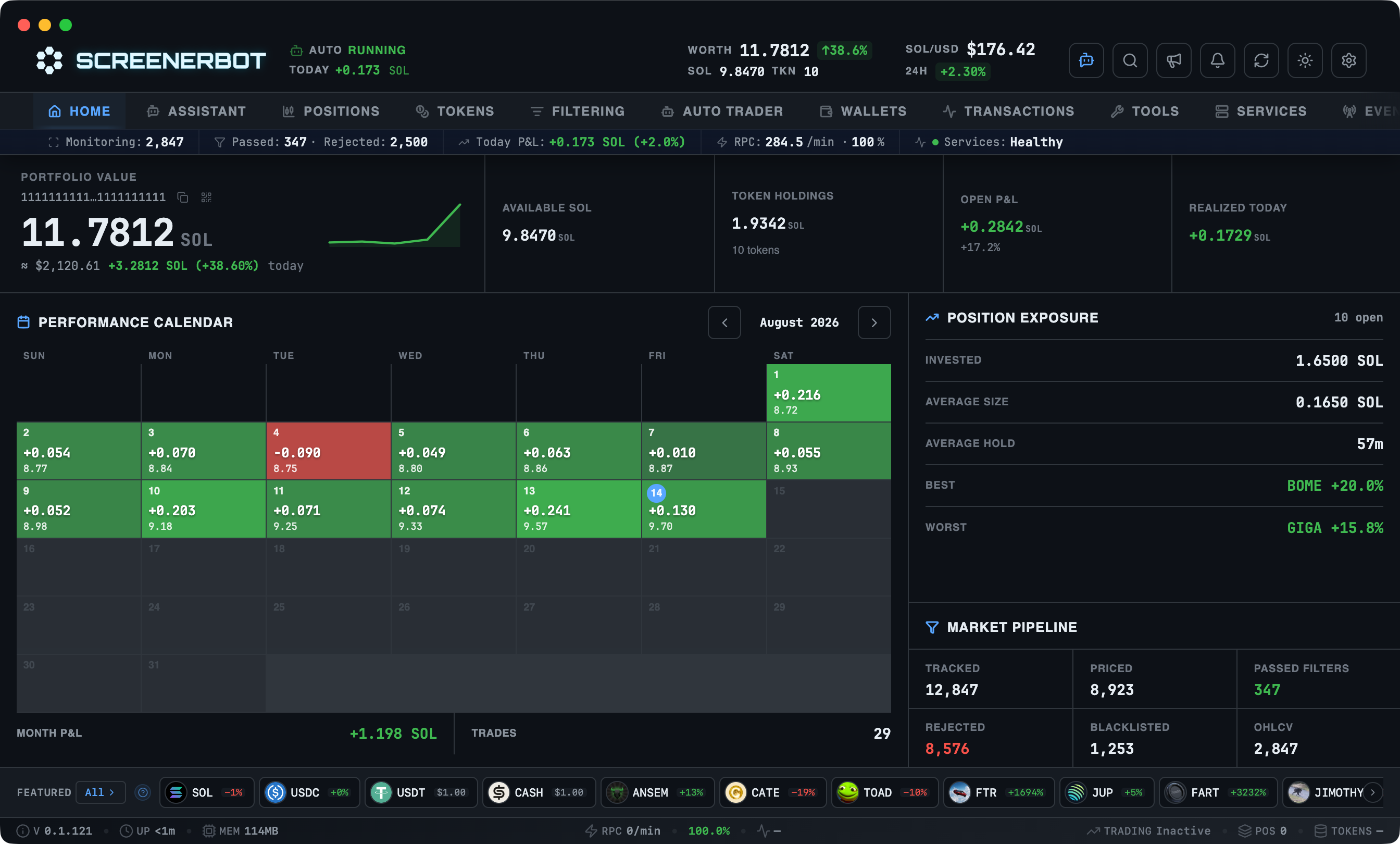
Real-time wallet balance, active positions, and market intelligence at a glance
Open Positions
Track entry prices, P&L, and ROI in real-time
Position History
Complete records of all closed trades with analytics
Transaction Monitor
Live feed of wallet transactions with DEX classification
what you get
Open Positions
Track entry prices, P&L, and ROI in real-time
Position History
Complete records of all closed trades with analytics
Transaction Monitor
Live feed of wallet transactions with DEX classification
signals
Algorithmic Trading Strategies
Why guess when you can use math? ScreenerBot supports advanced technical indicators that trigger trades automatically based on real-time market data.
Moving Average Triggers
Buy or sell when price crosses SMA/EMA levels. Use technical analysis without sitting at the computer.
View ReferencePrice Breakout Detection
Automatically enter trades when a token breaks its resistance levels with high volume confirmation.
View ReferenceVolume Spike Analysis
Catch the "smart money" moves. Enter before the crowd when unusual volume activity is detected.
View ReferenceConsecutive Candle Patterns
Identify trends with precision. Trigger actions after 3, 5, or 10 green/red candles in a row.
View ReferencePrice Change Signals
Trigger on configurable price movement over a chosen candle window and direction.
View ReferenceLiquidity Depth Filtering
Require a configurable amount of live pool liquidity before a strategy can signal.
View Referenceprice integrity
Why Accurate Prices Matter
A cached quote can look calm while the pool has already moved. ScreenerBot reads liquidity pools directly, calculates the SOL price locally, and feeds that same truth into entries, exits, stops, and P&L.
stale quote path
What most tools show
local pool path
What the strategy uses
truth window
Same token. Two prices.
Pool reserves first
Trading decisions use live DEX pool state, not delayed chart APIs or cached token pages.
Local calculation
The quote is decoded on your machine, so there is no hosted pricing layer between the pool and your strategy.
Cleaner execution
Entries, exits, stops, and P&L all read from the same price source instead of drifting across feeds.
exit control
Wealth Protection & Growth
The hardest part of trading is knowing when to leave. ScreenerBot turns exits into a rule stack: protect the entry, scale profits, trail the peak, and keep emergency control close.
protection window
Let winners run. Define the fall.
position lifecycle
Exit logic timeline
rule stack
06 modulesRisk comes off first
Breakeven logic can move the stop to entry once profit appears, protecting the position before greed takes over.
Upside stays open
Trailing stops and take-profit ladders can secure gains without forcing an early full exit.
Manual override stays close
Force exit controls remain available from the dashboard or Telegram when the market changes faster than your plan.
advanced_automation
Build Custom Trading Strategies
No coding required. Click, configure, and combine. ScreenerBot 's visual strategy builder lets you create sophisticated entry and exit logic using real-time market data and technical indicators.
Visual Strategy Builder
No code, no confusion. Browse 9+ condition types in an organized catalog, click to add them to your strategy, and configure with simple forms. Combine conditions with AND/OR/NOT operators to create complex logic.
Multi-Timeframe Analysis
Analyze tokens across 7 timeframes (1m to 1d) simultaneously. Set your strategy to 5m but check volume spikes on 1m candles, each condition can use a different timeframe for maximum flexibility.
Separate Entry & Exit Logic
Different rules for buying and selling. Enter on volume spikes above 50 SOL liquidity, exit when price breaks below 20-period MA. Each strategy type has dedicated conditions optimized for its purpose.
Performance Metrics
Track every strategy's win rate, execution time, and signal accuracy. See exactly which conditions trigger most often and optimize your logic based on real results, not guesswork.
conditions · 9+
example · momentum breakout
strategy "Momentum Breakout"

entry ALL { // Entry Condition (AND logic)
  Price Breakout → Upward, 20 candles lookback, 2% confirmation
  Volume Spike → 3x average volume over 10 candles
  Liquidity Level → Greater than 50 SOL
}

exit ANY { // Exit Condition (OR logic)
  Price to MA → Below 20-period MA by 5%
  Consecutive Candles → 3 red candles, 2% minimum drop each
}
This strategy enters on confirmed breakouts with high volume and safe liquidity, then exits when momentum reverses or price falls below the moving average.
evaluated in <50msTest strategies in real-time before deploying. See exactly which tokens match your criteria.
fn why_rust() -> Speed + Safety
Speaking Solana's Native Language: Rust
Here's something cool: Both Solana and ScreenerBot are built with the same programming language, Rust. It's like they speak the same native tongue.
Why does this matter? Rust is known for being incredibly fast (as fast as C++) while preventing the crashes and bugs common in other languages. Perfect for a trading bot that needs to be lightning-quick and rock-solid reliable.
engine_core
Never Crashes on You
Ever had software crash mid-task? Frustrating, right? Rust eliminates those crashes beforethe program even runs. It's like having a super-strict spell-checker that won't let you save a document with errors.
Lightning Fast Performance
Languages like Python or JavaScript are easy to learn, but they're slow. Rust is as fast as C++, the gold standard for performance, which means calculations happen in milliseconds, not seconds.
Does Everything at Once
Imagine trying to watch five screens, answer calls, and take notes simultaneously, chaos, right? Rust lets ScreenerBot juggle hundreds of tasks simultaneously without dropping the ball.
- Catch opportunities faster: While Python bots are still calculating, you're already in the trade
- Never miss an exit: No lag means your stop-losses and take-profits trigger exactly when they should
- Run worry-free:Set it and forget it, the bot doesn't crash or slow down over time
- Simple installation: Standard installers for your platform, easier updates and system integration
- Consistent performance: No random slowdowns during high-volume trading
- Battle-tested: Running 24/7 in production with 99.9% uptime
By using the same language as Solana itself, ScreenerBot achieves speed, stability, and safety that would be impossible with traditional scripting languages like Python or JavaScript.
infrastructure
Institutional Grade
Trading Infrastructure
Most bots and web tools are toys. ScreenerBot is built for professionals who need zero-downtime execution, MEV protection, and high-speed data.
Multi-Provider RPC Failover
Connect up to 10 RPCs. The bot automatically switches to the fastest, most stable provider in real-time.
Jito MEV Protection
Stay safe from sandwich attacks. Routes transactions through Jito bundles with custom tip control.
Circuit Breaker System
Intelligent protection that pauses requests to failing providers to prevent account bans and wasted SOL.
Local 90-Day OHLCV History
Keep your own price data. Local SQLite database stores detailed performance history for backtesting.
End-to-End Local Encryption
Your private keys never leave your device. All data is encrypted using military-grade AES-256.
Advanced CLI & Debug Bins
Inspect pool decoders, validate transactions, and run custom scripts with the built-in Rust tools.
[ everything you need ]
Complete Trading Suite
23 modules across 6 subsystems, working together seamlessly
Token Discovery
Continuously surfaces brand-new tokens from Gecko trending and DexScreener boosts, the moment they hit the chain.
Multi-Timeframe Charts
Local OHLCV history across 7 timeframes (1m to 1d) for every token you monitor.
Live Transaction Stream
WebSocket streaming of on-chain activity with full DEX swap analysis and verified P&L.
Multi-Layer Filtering
A six-stage pipeline (meta, on-chain, DexScreener, GeckoTerminal, RugCheck, AI) scores every token and records why it passed or was rejected.
On-Chain Scam Filter
Instant, zero-cost scam detection from on-chain data, with an authority-reputation system that auto-learns bad actors, no hardcoded lists.
Rug Pull Protection
RugCheck integration flags risky tokens before you buy: holder distribution, LP locks, and red flags.
AI Assistant
Ten LLM providers analyze tokens, guide entry and exit, and power a chat that can run trades and scheduled tasks with your permission.
Auto Trader
Set your entry and exit rules once; independent monitors execute them 24/7 while you sleep.
Wallet Copy
Follow selected Solana wallets with Paper mode, hard spending caps, measured delay, and your choice of exit control.
Strategy Builder
Combine price, volume, candle, liquidity, and position conditions with AND/OR/NOT logic.
Exit Automation
Trailing stops, ROI take-profits, and time-based exits fire the instant conditions are met.
Trading Safety
A force-stop kill switch, period-based loss limits, cooldowns, exposure caps, and separate entry/exit controls.
Live Portfolio View
Positions update in real time, P&L, ROI, and entry prices at a glance.
Position & DCA Tracking
Automatic break-even, dollar-cost averaging, partial exits, and full entry/exit history per trade.
Complete P&L
Your exact profit after fees, realized versus unrealized, across every position.
Wallet Monitoring
SOL and token balances with historical snapshots, CSV export, and automatic empty-ATA cleanup.
Multi-Provider RPC
Connect up to 10 RPCs with latency-based failover and a circuit breaker that sidesteps failing providers.
Local Encryption
Everything runs on your machine; private keys never leave the device, encrypted with AES-256.
Hot-Reload Config
Change any setting on the fly, no restart, and adjust your strategy as the market moves.
Telegram Control
Monitor and trade from your phone with TOTP auth, inline action buttons, and instant notifications.
Events & Actions
A structured event log plus real-time progress for every operation the bot performs.
[ for everyone ]
Built for Every Trading Style
Whether you're scalping micro-caps or managing a portfolio, ScreenerBot adapts to your strategy.
Active Traders
Fire manual buys and sells in milliseconds with best-route swaps across GMGN, Jupiter, and Raydium, priced from live pool data on your own machine, and drive it all from the dashboard or Telegram.
learn morePart-Time Traders
No time to watch charts? Set trailing stops, ROI take-profits, and time-based exits once, then let independent monitors run your rules 24/7 while you live your life.
learn morePosition Builders
Dollar-cost average into positions automatically and take partial exits on the way up. Build and scale systematically, without emotional hesitation.
learn morePortfolio Managers
Track dozens of tokens without losing your mind: live P&L after fees, wallet snapshots, and a six-stage filter that surfaces only what's worth your attention, all in one dashboard.
learn morepricing
Simple, Fair Pricing
ScreenerBot is free to download. Only pay 0.5% via Jupiter when you swap.
Swaps routed through Jupiter V6 with 0.5% referral fee. Always see exact costs before confirming.
creator program
That 0.5% does not all stay with us.
Send someone to ScreenerBot and you keep a share of every fee they generate, for as long as they keep trading. Not a one-off bounty, and not a number we make up: a commission only exists after the fee behind it has settled on Solana.
— swap fee · Jupiter routes —· ScreenerBot receives the rest
Every token they create on the Launchpad.
Every listing they boost on the Terminal.
- You
- —
- ScreenerBot
- —
Rates are read live from the programme, so this is the same number the payout engine uses. Whatever rate your code is on when you join is frozen onto it — changing the rates later never reprices commission you have already earned.
Take your link
Letters and numbers, 3 to 24 characters.
- No application, no follower minimum, and no KYC.
- A click is enough — your referrals never have to type a code.
- Paid in SOL to a wallet you prove with a signature.
why_local
Why Run It on Your Own Computer?
Cloud platforms are convenient, but they come with risks. ScreenerBot gives you something better: complete control, maximum speed, and true security.
Your Keys, Your Coins
Your wallet stays on your computer, period. ScreenerBot never touches your private keys, never stores your funds. Zero risk of platform hacks or "oops, we lost everyone's money."
Lightning-Fast Execution
No waiting for a server halfway across the world to process your request. Everything runs locally on your computer, connected directly to Solana. The result? Trades execute in milliseconds, not seconds.
Simple, Honest Pricing
Download is free. Using the bot is free. You only pay a tiny 0.5% fee when you actually trade (via Jupiter). No subscriptions, no hidden costs, no surprises.
how_it_works
Your ComputerYour WalletSolana BlockchainDEX Smart Contracts
No middlemen, no platforms, no trust required
[ transparency ]
Complete Trust, Zero Compromise
We connect to our servers for two things only: checking for updates and fetching featured tokens. No personal data is ever sent.
Where does your SOL go? When you buy a token, ~0.002 SOLis held as rent for the token account (ATA). This isn't lost — it's returned to your wallet when you sell and close the account. Auto-cleanup runs every 5 minutes to reclaim rent from empty accounts (can be disabled).
Our philosophy: Your data stays on your computer. We only provide the software.
open_source
Built in the Open
Every line of code is available to read, verify, and build from scratch. Transparency isn't a feature — it's the foundation.
Audit Every Line
No black boxes. Read the complete source, verify exactly what runs on your machine, and confirm how your wallet is handled — down to the last byte.
Build Your Own Binary
Clone the repo and run a single command. Compile a trusted binary straight from source and run it yourself — no pre-built binary required.
Modify for Personal Use
Fork it, tweak it, adapt it to your exact trading workflow. The license covers personal modifications freely.
Contribute & Report Bugs
Found an issue or have an idea that would help traders? Bug reports, feedback, and contributions make ScreenerBot better for everyone.
build_from_source
git clonecargo build --release./screenerbot --headlessyour own trusted binary
Source for every release lives on the Download page — no trust required.
Licensed under BSL 1.1. Converts to Apache 2.0 four years after each release. Terms of Service
quick_start
Start Trading in 3 Minutes
No complex setup. No coding required. Download, configure, trade.
Download & Install
Use the installer for your OS (Windows, macOS, or Linux). Standard installation packages provide easier updates and follow platform conventions.
Connect Your Wallet
Import your existing wallet or create a new one. Your private key is encrypted and stored locally. We never see it.
Configure & Trade
Set your filters, define your strategy, and let the bot work. Start with small amounts while you learn the ropes.
? faq ?
Common Questions
Everything you need to know before getting started
01Is ScreenerBot actually free?
Yes! Download and use are completely free. The only cost is a 0.5% fee on swaps, which is deducted automatically via Jupiter. No subscriptions, no hidden fees, no catch.
02Is my wallet safe?
Your private key stays encrypted on your computer. ScreenerBot never sends your keys anywhere. All trades are signed locally. Your funds are always safe because they stay in YOUR wallet—we have no access to them.
03Do I need coding knowledge?
Not at all! The dashboard is visual and intuitive. Configure filters with dropdowns, set trading rules with simple forms, and build strategies by clicking to add conditions. If you can use DexScreener, you can use ScreenerBot.
04How do I get started safely?
Start with small trade amounts to test your strategy with real market conditions. All your settings and positions are saved locally, so you can tweak and refine your approach as you learn.
05What if my internet disconnects?
Your positions and settings are saved locally. When you reconnect, the bot picks up right where it left off. No data loss, no orphaned trades.
06Which DEXs are supported?
11 pool protocols across 6 major Solana DEXs: Raydium (CPMM/CLMM/Legacy), Orca Whirlpool, Meteora (DLMM/DAMM/DBC), PumpFun (AMM/Legacy), Fluxbeam, and Moonit. Swaps route through Jupiter for best prices.
07Is ScreenerBot open source?
Yes. ScreenerBot is open source under the Business Source License 1.1 (BSL 1.1). You can read every line, build your own binary from source, and modify it for personal use. Source code for every release is on the Download page. The license converts to Apache 2.0 four years after each release. See our Open Source section for full details, or our Terms of Service for commercial use.
08Do you collect my data?
No. ScreenerBot runs 100% locally on your computer. The only server connection is a GET request to check for updates—no data is sent. All market data comes from public APIs (DexScreener, GeckoTerminal, RugCheck) and transactions go directly to Solana via your RPC.
09What is the minimum position size?
The minimum position size is 0.005 SOL (about $1-2). This means you can test strategies with minimal risk. Note: opening a position at minimum size starts at around -5% due to fees, but this is just $0.05-0.10 in real terms, the safest way to learn.
10Why does ~0.002 SOL stay in my wallet when I trade?
Solana requires a small rent deposit (~0.002 SOL) to create a token account (ATA) for each new token you hold. This rent is NOT lost—it returns to your wallet when you sell and close the account. ScreenerBot auto-cleans empty ATAs every 5 minutes to reclaim rent.
Still have questions?
Read the full documentationJoin Traders Taking Control
Stop relying on centralized platforms. Run your own trading infrastructure. Your computer, your keys, your profits.
Stop Missing Trades.
Start Automating.
Every minute you spend watching charts is a minute you could be living. Let ScreenerBot watch the market while you do literally anything else.
Windows • macOS • Linux • Free forever • 0.5% swap fee only